How to download ThisVid videos on iPhone and Android
No app, no extension, no account. The part worth getting right is which of the two files you take, because on a phone that decision is usually about data rather than quality.
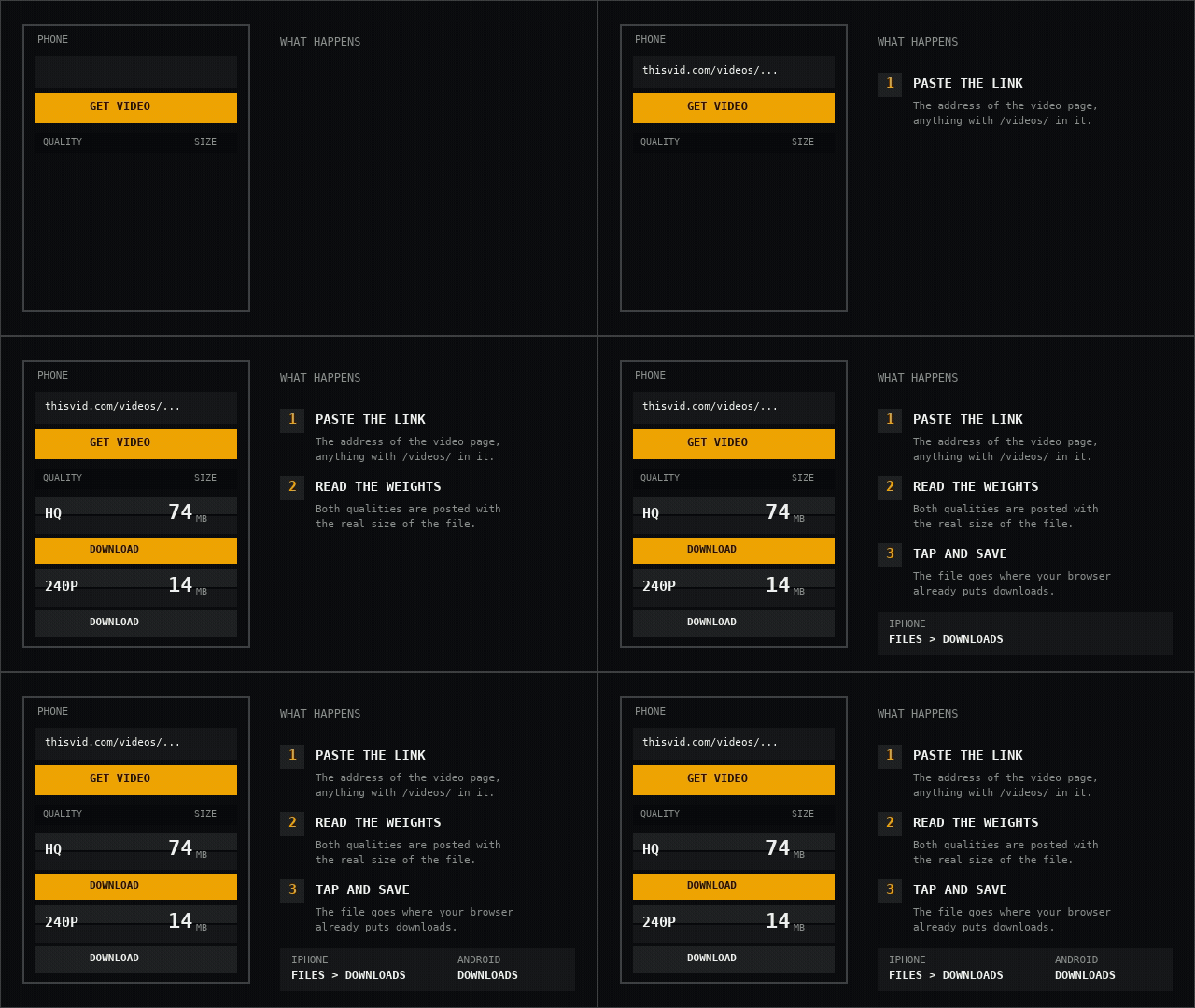
- Copy the video address. Open the video in your phone browser, tap the address bar once, and copy the whole thing. On the ThisVid app-style share sheet, "Copy link" gives you the same address. Anything containing
/videos/works, and an/embed/link works too. - Paste it into the field and tap Get video. The board reads the page and posts one row per quality, each with the real byte count of the file behind it. Nothing from ThisVid renders on the page before you do this.
- Read the two sizes before you choose. The row marked HQ is the original upload. The smaller row is the same video re-encoded by ThisVid for slow connections. On a five minute video the gap is often five to one.
- Tap Download on the row you want. Your browser takes over from there and saves the file the way it saves any other download. Nothing is installed and nothing asks you to sign in.
Where the file actually lands
On iPhone and iPad, Safari asks you to confirm the download, then puts the file wherever Safari's download location is set. Out of the box that is the Downloads folder inside the Files app — on iCloud Drive if you use it, on the device if you do not. You can change it in Settings, under Safari, then Downloads. If you cannot find a file you know finished, that setting is the first place to look.
On Android, Chrome and the browsers built on it drop the file into the Downloads folder and put a progress line in your notification shade. Tapping the finished notification opens it; the Files or My Files app finds it later.
In both cases the file arrives as an ordinary .mp4 named after the video and the quality you chose, so a phone gallery or any video player will open it without conversion.
Why the size matters more on a phone than anywhere else
A five minute video can be 77 MB at full quality and 14 MB at the smaller one. On a metered connection that is the difference between a download you take now and one that waits for wifi, and no thumbnail anywhere tells you which one you are about to get.
This is the reason the size is the largest thing in each row rather than a detail beside it. The number is read from the source before anything is offered to you, so it is the real byte count of the file you will receive — not an estimate, and not the same number twice.
If you are on mobile data and unsure, take the smaller row. It is the same video and the same length; ThisVid encoded it for exactly this situation.
If the connection drops halfway
Downloads support range requests, which is the technical way of saying your browser can ask for the rest of a file rather than the whole thing again. A transfer that dies at 60 MB of 77 MB continues from 60 MB.
On Android, Chrome usually offers a Resume button on the failed download and it works. On iOS the behaviour is less generous: Safari can resume from its download list, but leaving the browser for too long during a large transfer can end it. For a 77 MB file over mobile data, keeping Safari in the foreground until the number stops moving is the difference between finishing and starting over.
What it will not do
Private videos cannot be downloaded, on a phone or anywhere else. Their uploader restricted them to members they approved, and this tool only ever reads what is already public. Any site telling you otherwise is either wrong or fishing for a login.
Download links stop working about an hour after a video is read. This is deliberate — it keeps the link from being passed around as a permanent mirror. If a link has gone stale, paste the video address again and take the fresh one; it costs one tap.
Why there is no app
There is nothing an app would do here that the browser does not already do better. The file has to pass through a server for reasons covered in the FAQ, so a phone app would be a wrapper around the same request, with an install, a permission prompt and an update cycle attached to it.
It would also be the part of this that could quietly collect something. A page you visit and leave cannot.
Common questions
Do I need to install anything?
No. It runs in the browser you already have, on iOS and Android. There is no app and no extension.
Can I download while the screen is off?
On Android, usually yes — the download continues in the notification shade. On iOS, a long transfer can stop when Safari goes to the background, so leave it in the foreground for large files.
Will the video have a watermark?
No. The HQ row is the original upload, byte for byte. Nothing is re-encoded, resized or stamped.
Does it work on an iPad or a tablet?
Yes, identically. The layout widens but the steps are the same.
Paste a ThisVid link and see the weights for yourself.
Open the downloader